Das erste Feature
Diese Seite baut die Marken (Brands) des Templates von Grund auf: eine Entity, ihre Tabelle, Berechtigungen, ein Command mit Validierung, einen HTTP-Endpunkt, ein OData-Set mit Facetten und eine Blazor-Seite. Jedes Beispiel ist echter Code aus dem Template.
1. Contracts
Berechtigungsnamen und DTOs liegen im Contracts-Projekt, weil der Blazor-Client sie ebenfalls braucht.
public static class CatalogPermissions
{
    public const string GroupName = "Catalog";

    public static class Brands
    {
        public const string View = "Catalog.Brands.View";
        public const string Create = "Catalog.Brands.Create";
        public const string Edit = "Catalog.Brands.Edit";
        public const string Delete = "Catalog.Brands.Delete";
    }
}
public sealed record BrandDto(Guid Id, string Name, string? Description, decimal Tax);
public sealed class AddEditBrandRequest
{
    public string Name { get; set; } = string.Empty;

    public string? Description { get; set; }

    public decimal Tax { get; set; }
}
Der Request ist bewusst eine Klasse mit Settern: Der Bearbeitungsdialog bindet direkt daran.
2. Entity und Tabelle
[Realtime(CatalogPermissions.Brands.View)]
public sealed class Brand : AuditedEntity, IMultiTenant
{
    public required string Name { get; set; }

    public string? Description { get; set; }

    public decimal Tax { get; set; }

    public Guid TenantId { get; set; }
}
AuditedEntitybringtId(eine GUID Version 7),CreatedAt,CreatedBy,ModifiedAt,ModifiedBymit. Die Werte werden beim Speichern gesetzt.IMultiTenantfiltert Abfragen auf den Mandanten des aktuellen Benutzers und setztTenantIdbeim Anlegen.[Realtime]meldet jede Änderung an Clients mit der Berechtigung; Tabellen vonBrandDtoladen von selbst neu, siehe Realtime.
Module besitzen keinen eigenen DbContext. Sie tragen zu dem der App bei:
internal sealed class CatalogModelContributor : IModelContributor
{
    public void Apply(ModelBuilder modelBuilder) =>
        modelBuilder.Entity<Brand>(brand =>
        {
            brand.ToTable("Brands", "app");
            brand.Property(b => b.Name).HasMaxLength(200);
            brand.Property(b => b.Tax).HasPrecision(9, 4);
            brand.HasIndex(b => new { b.TenantId, b.Name }).IsUnique();
        });
}
Die Migration entsteht im Infrastruktur-Projekt:
3. Berechtigungen
internal sealed class CatalogPermissionDefinitions : IPermissionDefinitionContributor
{
    public void Define(PermissionDefinitionContext context) =>
        context.Group(CatalogPermissions.GroupName, "Catalog")
            .Add(CatalogPermissions.Brands.View, "View brands")
            .Add(CatalogPermissions.Brands.Create, "Create brands", CatalogPermissions.Brands.View)
            .Add(CatalogPermissions.Brands.Edit, "Edit brands", CatalogPermissions.Brands.View)
            .Add(CatalogPermissions.Brands.Delete, "Delete brands", CatalogPermissions.Brands.View);
}
Das dritte Argument ist die übergeordnete Berechtigung: Wer im Rolleneditor Create brands bekommt, hat damit auch View brands.
4. Das Command
Ein Anwendungsfall besteht aus Request, Handler und, wenn es Eingaben gibt, einem Validator.
public sealed record AddEditBrandCommand(Guid? Id, AddEditBrandRequest Brand) : ICommand<Result<BrandDto>>, IInvalidatesCache
{
    public IReadOnlyList<string> CacheTags => [DashboardCache.Tag];
}
internal sealed class AddEditBrandValidator : AbstractValidator<AddEditBrandCommand>
{
    public AddEditBrandValidator()
    {
        RuleFor(c => c.Brand.Name).NotEmpty().MaximumLength(200);
        RuleFor(c => c.Brand.Tax).InclusiveBetween(0, 100);
    }
}
internal sealed class AddEditBrandHandler(CoworkeeDbContext db, IPermissionChecker permissions) : IHandler<AddEditBrandCommand, Result<BrandDto>>
{
    public async Task<Result<BrandDto>> HandleAsync(AddEditBrandCommand command, CancellationToken cancellationToken)
    {
        var required = command.Id is null ? CatalogPermissions.Brands.Create : CatalogPermissions.Brands.Edit;
        if (!await permissions.IsGrantedAsync(required, cancellationToken))
        {
            return Error.Forbidden("catalog.forbidden", "You may not do this.");
        }

        var name = command.Brand.Name.Trim();
        if (await db.Set<Brand>().AnyAsync(b => b.Name == name && b.Id != command.Id, cancellationToken))
        {
            return BrandErrors.NameTaken;
        }

        var brand = command.Id is { } id ? await db.Set<Brand>().SingleOrDefaultAsync(b => b.Id == id, cancellationToken) : Add(name);
        if (brand is null)
        {
            return BrandErrors.NotFound;
        }

        brand.Name = name;
        brand.Description = command.Brand.Description;
        brand.Tax = command.Brand.Tax;
        return brand.ToDto();
    }

    private Brand Add(string name)
    {
        var brand = new Brand { Name = name };
        db.Add(brand);
        return brand;
    }
}
Was der Handler nicht tut: Er ruft kein SaveChangesAsync auf, fängt keine Validierungsfehler ab und schreibt keine Logs. Das erledigt die Pipeline um jeden Request herum. Braucht ein Request genau eine Berechtigung, reicht ein Attribut: [RequiresPermission(CatalogPermissions.Brands.Delete)] am Lösch-Command.
5. Endpunkt und OData-Set
internal static class BrandEndpoints
{
    public static void MapBrandEndpoints(this IEndpointRouteBuilder app)
    {
        var brands = app.MapCoworkeeApi("/api/v1/brands").WithTags("Brands").RequireAuthorization();
        brands.MapPost("/", (AddEditBrandRequest body, IDispatcher d, CancellationToken ct) => d.SendAsync(new AddEditBrandCommand(null, body), ct).ToHttpResult());
        brands.MapPut("/{id:guid}", (Guid id, AddEditBrandRequest body, IDispatcher d, CancellationToken ct) => d.SendAsync(new AddEditBrandCommand(id, body), ct).ToHttpResult());
        brands.MapPost("/delete", (IdsRequest body, IDispatcher d, CancellationToken ct) => d.SendAsync(new DeleteBrandsCommand(body.Ids), ct).ToHttpResult());
    }
}
ToHttpResult macht aus einem Result ein 200, 204 oder eine Problem-Details-Antwort mit passendem Status (400 bei Validierung, 403, 404, 409).
Fürs Lesen braucht es keinen Endpunkt. Registrieren Sie die Entity als OData-Set, und jede Tabelle bekommt Blättern, Sortieren, Filtern, Suche, Export und Facetten:
[DependsOn(typeof(CoworkeeODataModule))]
public sealed class MyAppCatalogModule : CoworkeeModule, IWebModule
{
    public override void ConfigureServices(ModuleServiceContext context)
    {
        context.Services.AddMessagingFromAssembly(typeof(MyAppCatalogModule).Assembly);
        context.Services.AddSingleton<IModelContributor, CatalogModelContributor>();
        context.Services.AddSingleton<IPermissionDefinitionContributor, CatalogPermissionDefinitions>();
        context.Services.AddODataEntity<Brand>("Brands", CatalogPermissions.Brands.View);
    }

    public void ConfigureApplication(WebApplication app) => app.MapBrandEndpoints();
}
GET /odata/Brands?$filter=contains(Name,'a')&$orderby=Name&$count=true funktioniert jetzt für alle mit View brands.
6. Die Blazor-Seite
@page "/catalog/brands"
@attribute [Authorize(Policy = PermissionPolicy.Prefix + CatalogPermissions.Brands.View)]

<PageHeader Title="Brands" Description="Manage brands." />
<CoworkeeDataTable @ref="_table" T="BrandDto" EntitySet="Brands" SearchFields="SearchFields" MultiSelection="true" DescribeItem="b => b.Name"
                   CreatePermission="@CatalogPermissions.Brands.Create" EditPermission="@CatalogPermissions.Brands.Edit" DeletePermission="@CatalogPermissions.Brands.Delete"
                   OnCreate="CreateAsync" OnEdit="EditAsync" OnDelete="DeleteAsync">
    <Columns>
        <PropertyColumn Property="b => b.Name" />
        <PropertyColumn Property="b => b.Description" />
        <PropertyColumn Property="b => b.Tax" Format="0.##" />
    </Columns>
</CoworkeeDataTable>
public partial class Brands
{
    private static readonly string[] SearchFields = [nameof(BrandDto.Name), nameof(BrandDto.Description)];
    private CoworkeeDataTable<BrandDto> _table = null!;

    [Inject] private ICatalogApi Api { get; set; } = null!;

    [Inject] private IDialogService Dialogs { get; set; } = null!;

    [Inject] private ISnackbar Snackbar { get; set; } = null!;

    private Task CreateAsync() => EditAsync(null, new AddEditBrandRequest());

    private Task EditAsync(BrandDto brand) =>
        EditAsync(brand.Id, new AddEditBrandRequest { Name = brand.Name, Description = brand.Description, Tax = brand.Tax });

    private async Task EditAsync(Guid? id, AddEditBrandRequest model)
    {
        if (await Dialogs.ShowEditAsync(id is null ? "New brand" : "Edit brand", model) is { } saved)
        {
            await Snackbar.RunAsync(() => Api.SaveBrandAsync(id, saved), "Brand saved");
        }
    }

    private Task DeleteAsync(IReadOnlyCollection<BrandDto> brands) => Snackbar.RunAsync(() => Api.DeleteBrandsAsync([.. brands.Select(b => b.Id)]));
}
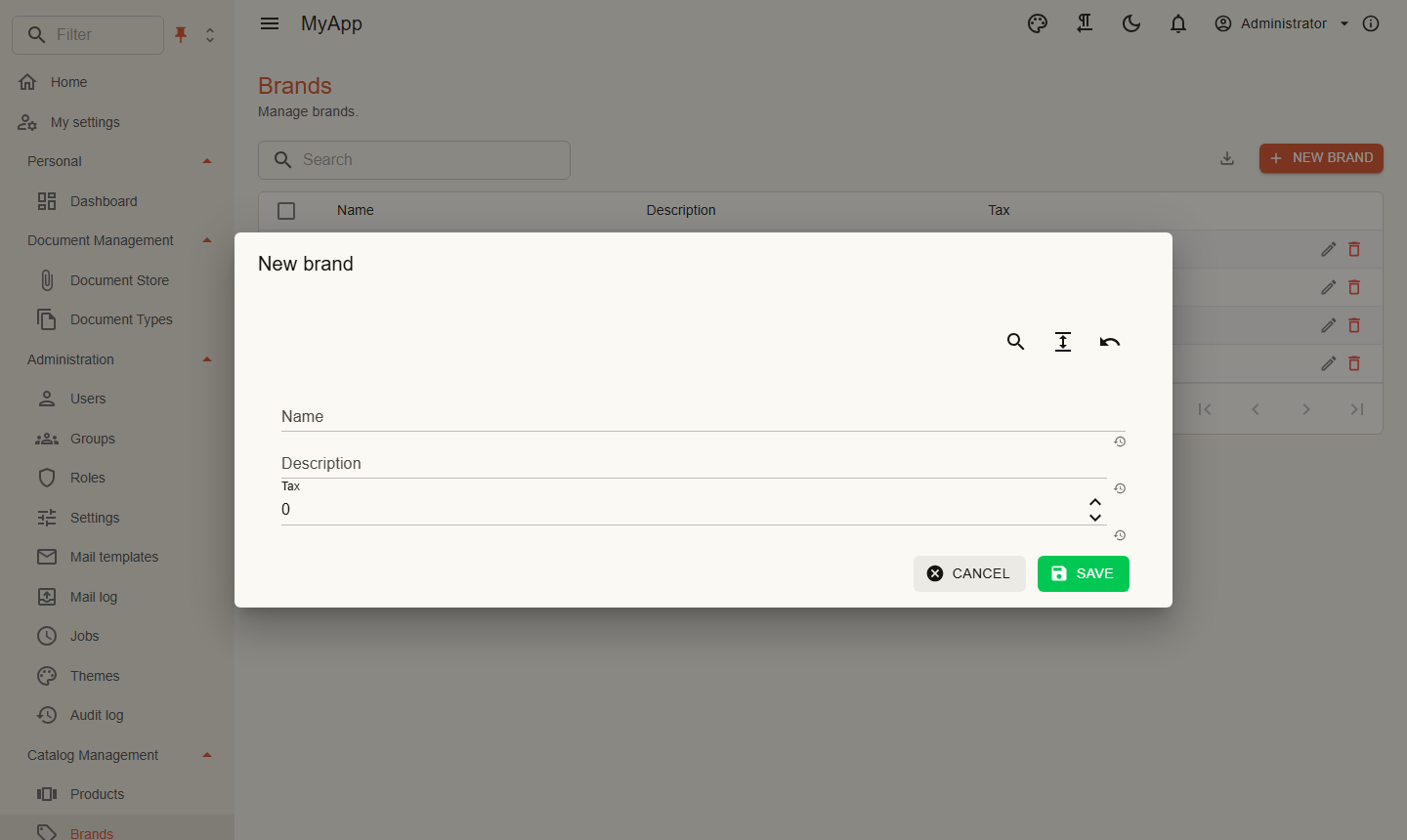
Schaltflächen, für die die Berechtigung fehlt, werden nicht gerendert. ShowEditAsync baut das Formular mit MudBlazor.Extensions aus dem Request-Typ; für Besonderes schreiben Sie einen eigenen Dialog wie ProductDialog im Template.
Zum Schluss der Navigationseintrag:
internal sealed class MyAppNavigation : INavigationContributor
{
    public IEnumerable<CoworkeeNavItem> Items =>
    [
        new("Brands", "/catalog/brands", Icons.Material.Outlined.Sell, CatalogPermissions.Brands.View, Group: "Catalog Management"),
    ];
}
Was Sie nicht schreiben mussten
Logging, Transaktionen, Antworten bei Validierungsfehlern, die Berechtigungsprüfung der Liste, Blättern und Filtern auf dem Server, CSV-Export, die Löschbestätigung, das Neuladen, wenn jemand anderes eine Marke ändert, das Audit. Das kommt aus den Paketen.
Wie es weitergeht
- Anwendungsdienste: Statt Endpunkte zu mappen und einen API-Client zu schreiben, deklarieren Sie ein Interface in den Contracts; Server-Endpunkte und Blazor-Client werden generiert. Die Aufträge des Templates sind so gebaut.
- Client-Entities: Markieren Sie eine Entity mit
[ClientEntity], und der Browser hält ihre Zeilen vor; die Tabelle filtert, sortiert und gruppiert ohne Roundtrip. Das Template macht es mit 100.000 Aufträgen.