Crosshair Overlay
A topmost custom crosshair drawn over the game. Useful when the game’s own crosshair is too small, too colorful for your monitor, or hidden by hipfire spread.
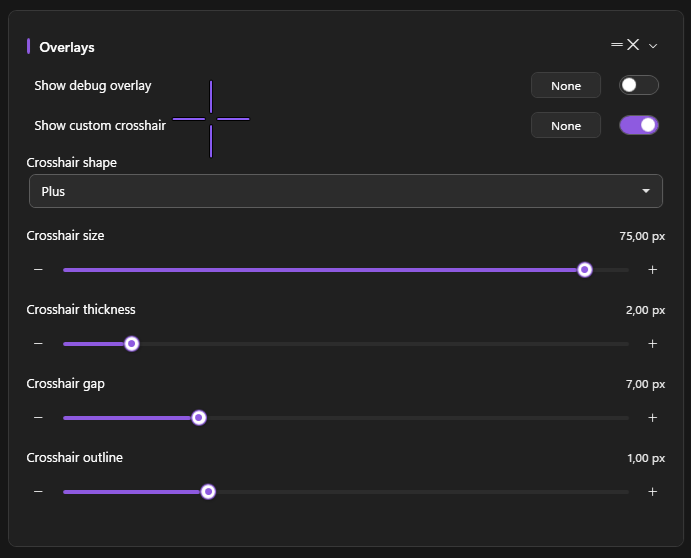
What it does
The crosshair overlay is a click-through, transparent WPF window painted at the exact center of your active monitor. It updates as you change shape / color / size on the Settings page.
How to enable
Settings → Overlays → Show Custom Crosshair
The crosshair appears immediately when you toggle it on. It survives alt-tab and stays on top of fullscreen games (using DXGI capture exclusion — see Hide UI from capture).
Configuration options
All settings live on the Overlays card in Settings.
| Setting | What it does | Default |
|---|---|---|
| Crosshair Shape | Dot / Cross / Plus / Circle / CircleDot / T | Plus |
| Crosshair Size | Total size in pixels (4–80) | 16 |
| Crosshair Thickness | Stroke width (1–10) | 2 |
| Crosshair Gap | Center gap for Plus / Cross (0–30) | 4 |
| Crosshair Outline | Outline thickness (0–6) — 0 disables the outline | 1 |
| Color | ARGB hex (set elsewhere via the color picker) | #FF8B5CF6 (PowerAim purple) |
| Outline Color | Outline ARGB hex | #FF000000 (black) |
The six shapes
- Dot — single filled circle at the center
- Cross —
+without a center gap - Plus —
+with a center gap (the default) - Circle — open ring
- CircleDot — open ring + center dot
- T — three-arm crosshair (omits the bottom)
Tips
- Outline 1 with a dark outline color makes the crosshair readable over both light and dark backgrounds.
- Small Plus with a 4 px gap is the most “professional” look — visible but doesn’t cover the head.
- For RTS / strategy games, use Dot — keeps the crosshair tiny so you can see what you’re clicking.
Troubleshooting
- Crosshair appears off-center — PowerAim draws it at the display center, not the game center. If your game window isn’t fullscreen on the same monitor PowerAim is targeting, the crosshair will be off.
- Game minimizes when I toggle it on — that’s the WPF window stealing focus. Re-focus the game manually. (We’re working on a fix.)
- Crosshair is captured by my recording software — disable Hide UI from Capture on the Settings page. (The opposite is the usual problem — the crosshair shouldn’t be visible to OBS by default.)