Recoil Patterns
Record the recoil drift of a specific gun, save it as a named pattern, and play it back to perfectly counter the spray. Patterns are the strongest mode of the Anti-Recoil system.
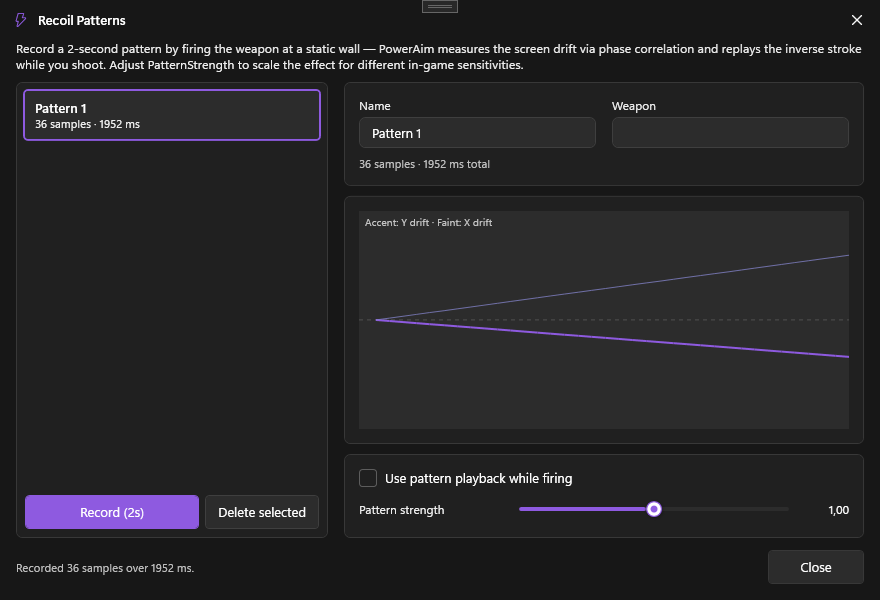
What it does
A pattern is a list of timestamped 2D deltas — a recording of how the crosshair drifted while you held fire. At playback, PowerAim re-applies those deltas (scaled by PatternStrength) while you hold the anti-recoil key.
Patterns are stored under AppConfig.AntiRecoilSettings.Patterns and persist with the config.
How to record a pattern
- Aim Tools → AntiRecoil → Recoil Patterns
- Click + New Pattern, name it (e.g. “AK-47”)
- In-game, point at a flat wall
- Click Record in the dialog
- Spray your weapon onto the wall for ~3 seconds
- Click Stop (or the button again — recording is cooperative; clicking it twice aborts)
- Inspect the drift-curve preview — it should look like the gun’s spray pattern (typically up + slight zig-zag)
PowerAim suspends GlobalActive while recording so the aim pipeline doesn’t fight you. It’s restored when the recording window closes.
How to arm a pattern
- In the same dialog, select the pattern you want to use
- The Anti-Recoil card outside the dialog shows the active pattern’s name + strength
- Toggle Use Pattern Playback on
- Hold the Anti-Recoil Keybind in-game while firing — the pattern plays back
The active pattern’s strength slider scales every sample. 1.0 = exact, lower = dampened, higher = amplified.
How to share a pattern
Patterns are part of your config (.cfg file). If you save your config after creating a pattern, the next person who loads it gets the pattern too. There’s currently no per-pattern export — share configs instead.
Configuration options
| Setting | What it does | Default |
|---|---|---|
| Use Pattern Recoil | Master toggle on the AntiRecoil card | Off |
| Active Pattern Name | Which named pattern to replay | empty |
| Pattern Strength | Per-pattern multiplier (0.5 - 2.0 typical) | 1.0 |
Tips
- Record at the same in-game sensitivity you’ll play at. Patterns are pixel-deltas in screen space; changing sensitivity changes how much pixel-movement a given mouse-delta produces.
- Patterns work best on full-auto weapons with a consistent spray. Burst weapons with controlled bursts are also fine. Pure-RNG buckshot guns don’t have a pattern.
- Use the strength slider to share patterns across players. If a friend uses your “AK-47” pattern but their sensitivity is 1.5× yours,
PatternStrength = 1.5will scale it correctly. - Reduce sample noise: shoot at a uniform wall, not a textured one. PowerAim’s recorder uses the same image-tracking as the BETA anti-recoil — busy textures hurt accuracy.
Troubleshooting
- Pattern “drifts” off-target — strength too high, or the pattern was recorded at a different sensitivity. Try
PatternStrength = 0.85and ramp up. - Pattern feels jerky — record a fresh one in a quieter area. The recorder is sensitive to camera shake from movement keys.
- Playback runs out before the magazine — the pattern is shorter than your spray. Record a longer pattern (hold fire longer during recording).
- Pattern playback fights image-based anti-recoil — precedence is pattern > image-based > legacy. If you see fighting, both are accidentally on; disable the image-based BETA toggle.