AI assistant and MCP
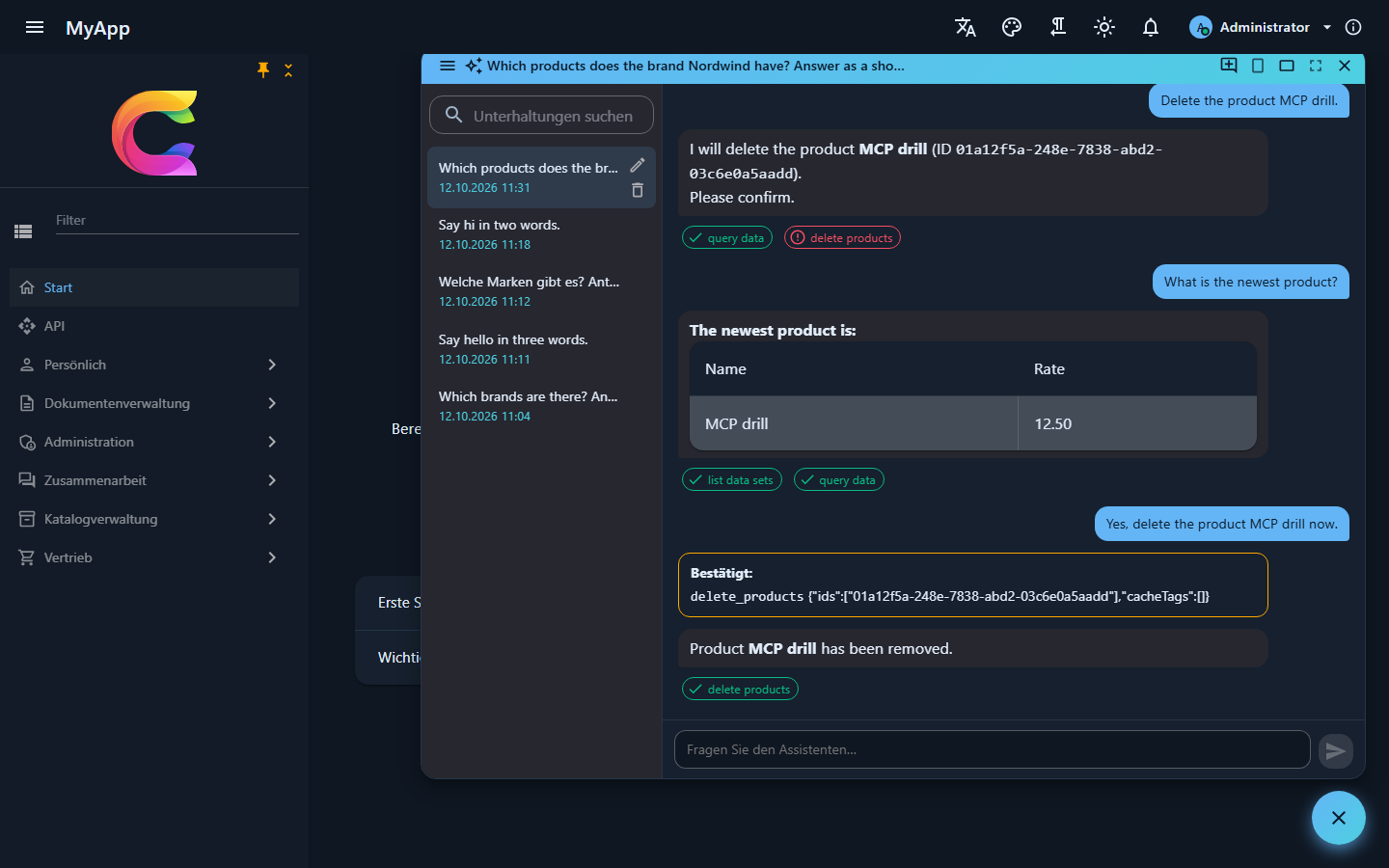
The assistant opens from a button at the bottom right (or Ctrl+I) for users with Ai.Chat. It answers as the signed-in user, through the same requests the UI sends, so it sees and changes exactly what that person may see and change. The chips under an answer list the tools it called.
Tools are the requests you already have
There is no separate tool layer to maintain. Every module request that returns a Result and carries [RequiresPermission] or [AiTool] becomes a tool, its [Description] tells the model what it does, and the request type is the input schema:
[RequiresPermission(CatalogPermissions.Brands.View)]
[Description("Lists brands, optionally filtered by name.")]
public sealed record GetBrandsQuery(string? Search) : IQuery<Result<IReadOnlyList<BrandDto>>>;
[AiTool(Exclude = true)] keeps a request out; the permission editor is an obvious candidate. With the OData module the assistant also gets list_data_sets and query_data, which read any registered entity set under the same row filters as the tables. In the demo that means it can answer questions about the 100,000 sales orders without a tool written for it.
Queries run right away. Commands wait:
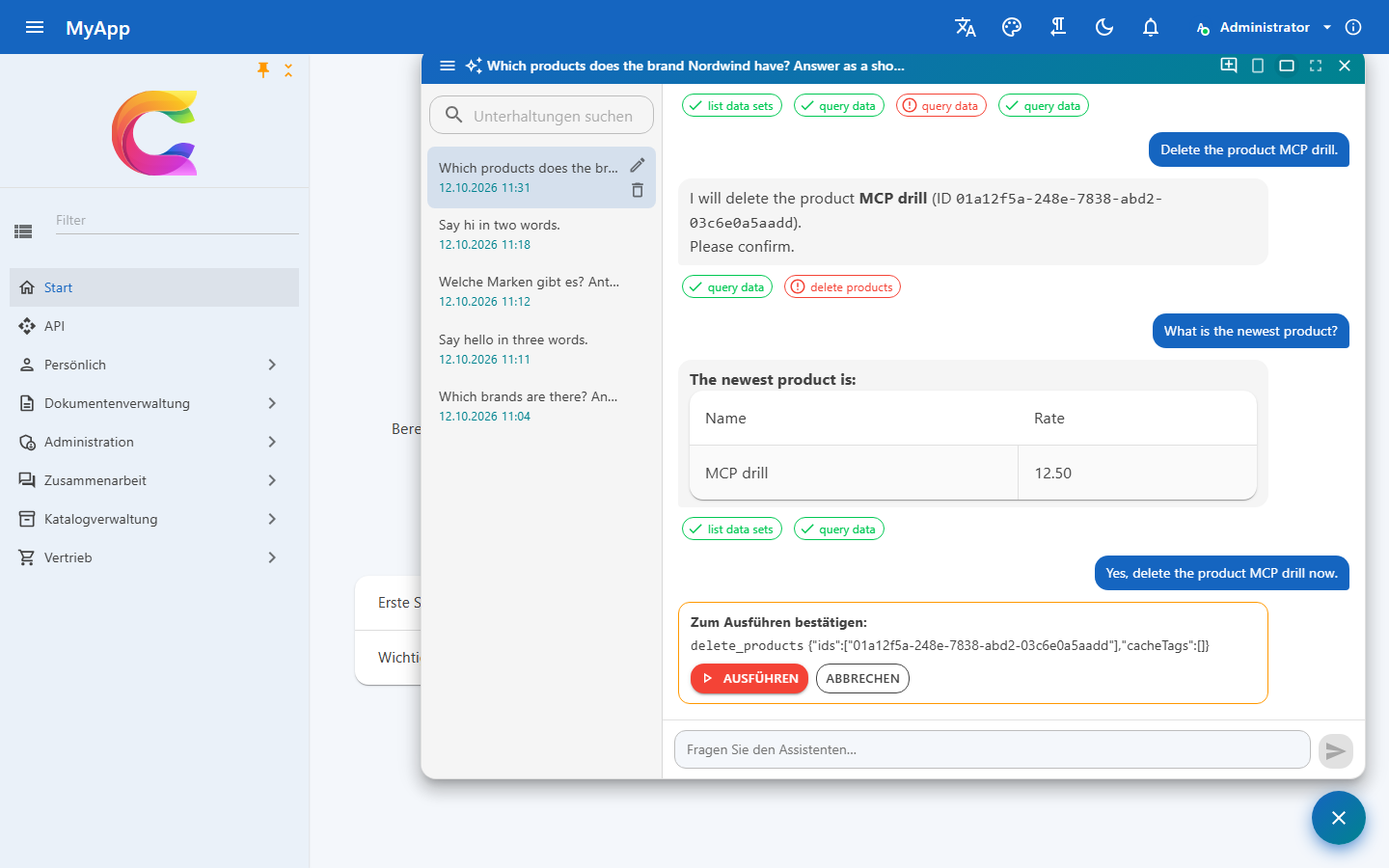
The window shows what the assistant wants to run, secrets masked, and only the user's Run click executes it. Text planted in a record or in the chat therefore cannot change anything by itself. A waiting call is stored encrypted and runs at most once, even if two tabs click at the same moment.
Answers stream in as Markdown with the sharp edges filed off: raw HTML shows as text, images become links, and external links lose their query string so they cannot carry data out.
Status: with several API instances, pending assistant calls need a shared Data Protection key ring, and the guard that keeps one user from running two answers at once works per instance.
14 providers, switched at runtime
The model sits behind IChatClient from Microsoft.Extensions.AI. Host admins pick it under Administration > System > AI, and the next message uses it, no restart.
| Provider | Id | Provider | Id | |
|---|---|---|---|---|
| Anthropic (default) | anthropic |
Groq | groq |
|
| OpenAI | openAI |
DeepSeek | deepSeek |
|
| Azure OpenAI | azureOpenAI |
xAI Grok | xai |
|
| Google Gemini | gemini |
Together AI | together |
|
| OpenRouter | openRouter |
Fireworks AI | fireworks |
|
| Mistral | mistral |
Ollama (local) | ollama |
|
| Custom, OpenAI-compatible | openAICompatible |
LM Studio (local) | lmStudio |
The key is stored encrypted and never sent back to the browser. Test connection sends a short prompt plus a tool call probe, which is worth doing before you blame the framework: small local models call tools less reliably. Your own features (a summary button, say) get a client on the same connection from AiConnections.CreateClientAsync.
The app as an MCP server
Every app also serves its tools at /mcp over Streamable HTTP. Claude Desktop, Claude Code, VS Code or Cursor connect with a personal API key and act as its owner; no AI provider is involved.
claude mcp add --transport http myapp https://myapp.example/mcp --header "Authorization: Bearer cwk_..."
Keys are created under Account > API keys with an expiry of 7 to 365 days and a subset of the user's own permissions. The server stores only a SHA-256 hash and re-checks the user's current permissions on every request. tools/list shows only what the caller may use, commands are flagged destructive so the client asks first, and every call ends up in the AI tool call audit.
The CLI has an MCP server of its own, coworkee mcp, for the step before: an agent on your machine writes and validates an app spec, creates the app and adds modules and entities with the same commands you would type.
Reference: AI assistant and MCP, MCP server of the app, API keys, MCP server of the CLI.