Identity and permissions
Sign-in runs on its own host, an OpenID Connect server built on OpenIddict. The web host acts as backend for frontend: it does the code flow with PKCE, keeps the tokens in a server-side session and hands the browser a cookie. The API checks bearer tokens. The browser never holds an access token.
A new installation either seeds its tenant, administrator and roles from the migration service (the template does that) or asks for them in a setup wizard on first start, which is how Sharemee comes up.
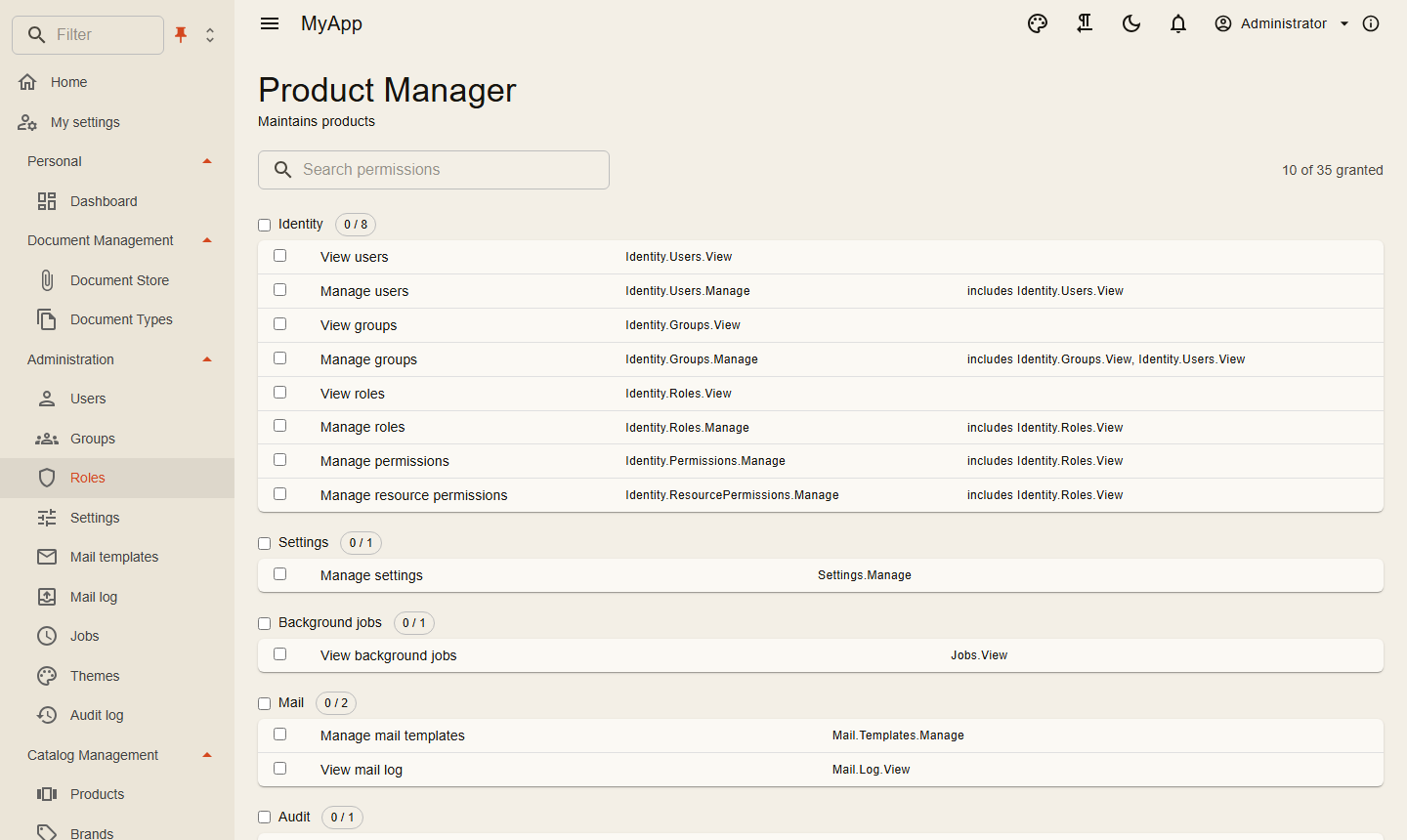
Who may do what
Permissions are strings that modules define. They are granted to roles, to groups or to one user, and the role editor shows them as a matrix with a toggle per group. A request declares what it needs with [RequiresPermission], and the dispatcher checks it before the handler runs.
Grants can also target a single resource, one folder for example, and inherit down a hierarchy you describe with IResourceHierarchy. Blazor pages hide buttons and menu entries the user can't use, but that is cosmetic. The server decides.
Administrators edit everything about a user on one page, from the email address to lockout and two-step verification reset. Sign out everywhere and Lock act at once: tokens carry a hash of the security stamp, the API compares it on every request, and with Redis the other instances hear about it immediately.
Keycloak and other providers
Any OpenID Connect provider can sign users in; each one is a section under Coworkee:Auth:External:Providers. An external login joins an existing account only when the provider marks the email as verified (or is configured with TrustEmail). In development, options.UseKeycloak() in the Aspire app host starts Keycloak with a realm that has the same users and passwords as the app.
Whether people sign in with a password, a provider or both is the setting Auth.LoginMode, changeable at runtime. Self registration (off unless Account.AllowRegistration is set) can require activation by an administrator, a confirmed address, allowed address patterns and uploaded documents. Password rules are settings too, up to a history of 24 passwords, and every password field lists the rules in force.
Keys and personal data
Scripts and AI clients use personal API keys: cwk_ plus 64 hex characters, shown once, stored as a SHA-256 hash, valid for 7 to 365 days. A key never has more than its user has right now; take a role away from the user and the key loses it on the next request.
Modules that store data about a person implement IPersonalDataContributor. The Privacy tab of the account page then downloads everything as personal-data.json, or deletes the account.
Status: version 0.0.1.x, so names in this area can still change between releases; the changelog lists what to adapt.
Reference: authentication and Keycloak, permissions, registration and sign-in rules, clients, sessions and password rules, sign-in pages, API keys, privacy.