Modules and tooling
[DependsOn(typeof(CoworkeeODataModule), typeof(CoworkeeStorageModule))]
public sealed class MyAppDocumentsModule : CoworkeeModule, IWebModule
{
    public override void ConfigureServices(ModuleServiceContext context)
    {
        context.Services.AddMessagingFromAssembly(typeof(MyAppDocumentsModule).Assembly);
        context.Services.AddODataEntity<Document>("Documents", DocumentPermissions.Documents.View, d => d.BlobKey);
    }

    public void ConfigureApplication(WebApplication app) => app.MapDocumentEndpoints();
}
builder.AddCoworkee<MyAppApiModule>();   // the root module; the rest follows from [DependsOn]
var app = builder.Build();
app.UseCoworkee();
That is the documents module of the generated template (the demo app runs the same one), plus the lines that put it into the API host. A module registers its services, maps its endpoints and names the modules it needs. Coworkee loads the graph once, in dependency order.
The result is a modular monolith on ASP.NET Core: one process per host, one database, code split along features. The API, the auth server and the migration service each name their own root module and get different graphs from the same packages. The auth host never loads the documents module, so it pays nothing for it.
Modules don't edit central lists either. Entity mappings come in through IModelContributor, menu entries through INavigationContributor. Removing a module removes its contributions, and that is the whole change.
One pipeline for every request
Each use case is a command or a query sent through IDispatcher. Endpoints, background jobs and the AI assistant send the same requests, so there is no side door around validation or permission checks.
| Order | Step | |
|---|---|---|
| 100 | Logging | warns when a request takes longer than 500 ms |
| 200 | Authorization | [RequiresPermission] on the request type |
| 300 | Validation | FluentValidation, with field messages |
| 350 | Caching | ICachedQuery from HybridCache, IInvalidatesCache clears tags |
| 400 | Unit of work | saves the DbContext once after a successful command |
Handlers return a Result for expected failures, and ToHttpResult maps it to 400, 404, 403 or 409. Your own cross-cutting code goes in as IRequestMiddleware, or as a typed IRequestBehavior when it concerns one request only.
Aggregates raise domain events; their handlers run after the commit, through the outbox, as the user who caused them. Integration events use the same outbox through IEventBus. Without a transport they stay inside the app. With Coworkee.EventBus.RabbitMq they travel over RabbitMQ, and an inbox table keeps the handlers idempotent.
Everything ships as NuGet packages starting with Coworkee., pinned by one <CoworkeeVersion> in Directory.Packages.props. coworkee update changes that number.
The CLI, the Studio and the MCP server
dotnet tool install -g Coworkee.Cli
coworkee new Shop --no-samples --files --theme Forest
cd Shop
coworkee run
coworkee new creates the solution (Aspire app host, API, auth server, Blazor web app, migrations), restores it and adds the first migration if the chosen modules need one. A JSON spec can describe the whole app up front, own modules and entities included: coworkee new --spec shop.json. Later, coworkee entity add generates a feature from the entity down to a Blazor page with a data table.
For people who would rather click, coworkee ui installs and opens Coworkee Studio, a desktop wizard for Windows, macOS and Linux. It explains each option with its trade-off (the Architecture page starts with presets from Minimal to SaaS platform), shows what an entity will generate and can start the new app afterwards.
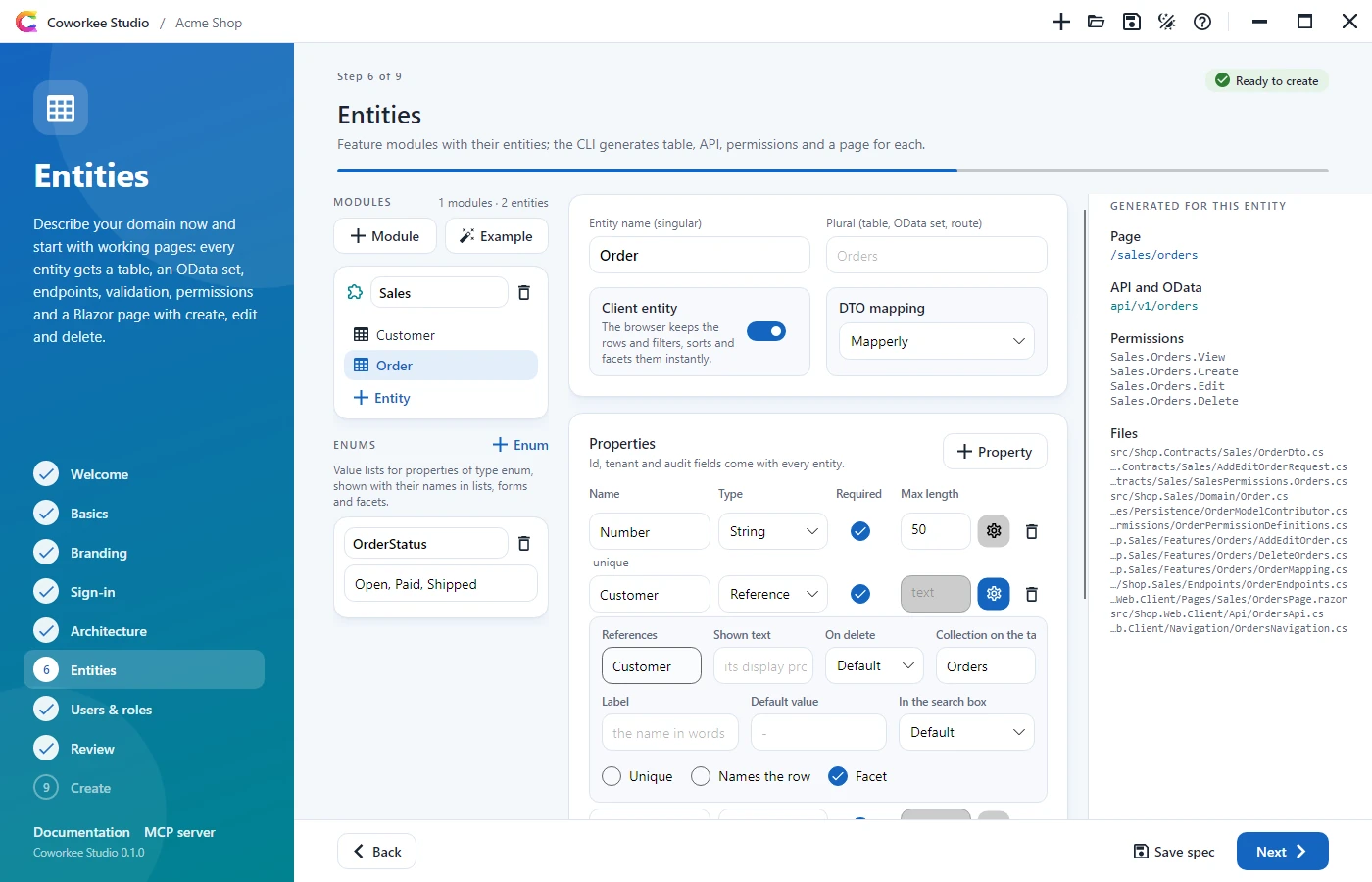
Agents get coworkee mcp, a Model Context Protocol server over stdio. Claude Code registers it with claude mcp add coworkee -- coworkee mcp; the agent then reads the options, writes and validates a spec and calls the same commands you would type.
Status: Coworkee is at version 0.0.1.x. Entity specs have no many-to-many relations yet, and of the deployment targets only Docker Compose has been run end to end (see Deployment).
Reference: modules, messaging and pipeline, events and locks, command line, Coworkee Studio, MCP server of the CLI.