MCP server of the app
Every Coworkee app is an MCP server: Claude Desktop, Claude Code, VS Code, Cursor and other MCP clients connect to it and use the app's tools as the user who owns the API key. The tools are the same as those of the AI assistant; no model or AI provider is needed for MCP.
- Transport: Streamable HTTP, stateless, so every request is authenticated on its own.
- Address: the API maps it under
/mcp. The web host forwards it as well, so clients use the address of the app (https://myapp.example/mcp). The web host passes on only the API key (Authorization: Bearer cwk_…orX-Api-Key) and the MCP headers: never the browser session, its cookies or its token, and no path with dot segments or encoded slashes. - Who: users with the permission
Ai.Chat. With an API key,Ai.Chatmust be among the key's permissions. - Rate limit: the
aipolicy, counted per user.
Enabled is on by default; false maps no MCP endpoint at all. Set both keys on the API and the web host, which forwards the same path.
At runtime, administrators switch the server off with the global setting Mcp.Enabled (Settings > AI assistant > MCP server enabled, default on): then tools/list is empty and tools/call runs nothing, also with valid keys. It is independent of Ai.Enabled: MCP needs no model.
Tools
The tools come from the same places as the assistant's:
- requests registered with
services.AddAiTool<TRequest>("name", "description"), - every request of a loaded module that returns a
Resultand carries[RequiresPermission]or[AiTool];[AiTool(Exclude = true)]keeps one out, - with the OData module,
list_data_sets(the sets the user may read, with their fields and types) andquery_data(rows of a set withfilter,orderBy,select,topandskip, with the permissions, row filters and hidden properties of the tables).
tools/list names only the tools the caller may use. Queries are marked read only. Every command, which changes data, is marked destructive, so clients ask their user before they run it; a command that only adds or can safely run twice opts out with NonDestructive:
[AiTool("Pins a product to the start page.", NonDestructive = true)]
[RequiresPermission(CatalogPermissions.Products.Edit)]
public sealed record PinProductCommand(Guid Id) : ICommand<Result>;
Every call runs through the dispatcher as the calling user: permissions, organisation, validation and the unit of work apply as in the API, and response filters shape the result as they shape the API's answers. Each call lands in the AI tool call audit with the channel mcp, the user and the API key.
Connecting a client
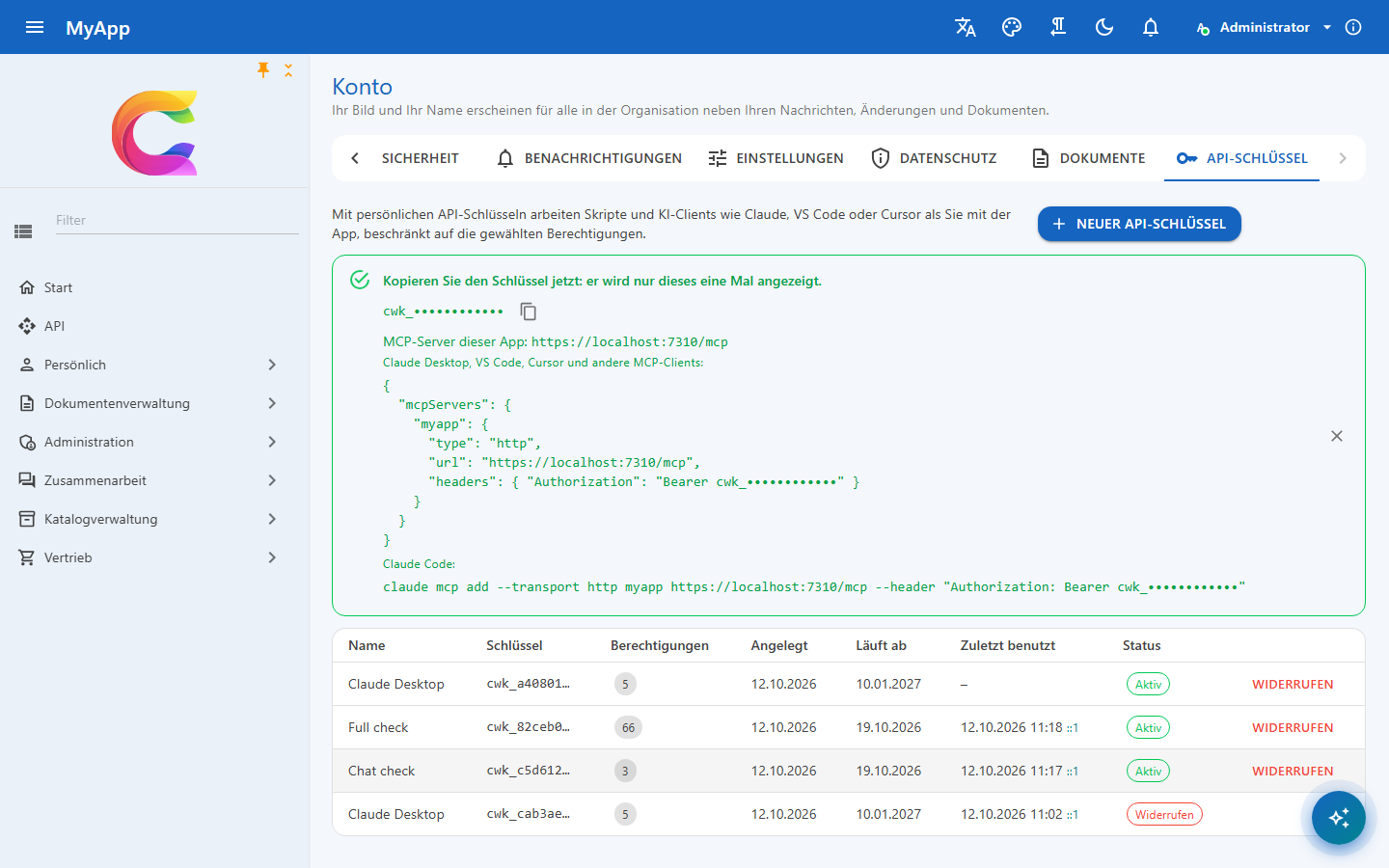
Create a key under Account > API keys, with the permission Use the assistant and the MCP server and the permissions the tools need. The page shows the key once, together with the address and a ready configuration.
Claude Desktop
claude_desktop_config.json:
{
  "mcpServers": {
    "myapp": {
      "type": "http",
      "url": "https://myapp.example/mcp",
      "headers": { "Authorization": "Bearer cwk_..." }
    }
  }
}
Versions without remote servers in the configuration file go through mcp-remote:
{
  "mcpServers": {
    "myapp": {
      "command": "npx",
      "args": ["mcp-remote", "https://myapp.example/mcp", "--header", "Authorization: Bearer ${MYAPP_KEY}"],
      "env": { "MYAPP_KEY": "cwk_..." }
    }
  }
}
Claude Code
claude mcp add --transport http myapp https://myapp.example/mcp --header "Authorization: Bearer cwk_..."
VS Code
.vscode/mcp.json – VS Code asks for the key once and stores it:
{
  "servers": {
    "myapp": {
      "type": "http",
      "url": "https://myapp.example/mcp",
      "headers": { "Authorization": "Bearer ${input:myapp-key}" }
    }
  },
  "inputs": [
    { "type": "promptString", "id": "myapp-key", "description": "MyApp API key", "password": true }
  ]
}
Cursor
~/.cursor/mcp.json:
{
  "mcpServers": {
    "myapp": {
      "url": "https://myapp.example/mcp",
      "headers": { "Authorization": "Bearer cwk_..." }
    }
  }
}
MCP Inspector
Transport Streamable HTTP, URL https://myapp.example/mcp, header Authorization with Bearer cwk_....
C
using ModelContextProtocol.Client;

var http = new HttpClient();
http.DefaultRequestHeaders.Authorization = new("Bearer", Environment.GetEnvironmentVariable("MYAPP_KEY"));
await using var client = await McpClient.CreateAsync(new HttpClientTransport(
    new HttpClientTransportOptions { Endpoint = new Uri("https://myapp.example/mcp"), TransportMode = HttpTransportMode.StreamableHttp }, http));

foreach (var tool in await client.ListToolsAsync())
{
    Console.WriteLine($"{tool.Name}: {tool.Description}");
}

var result = await client.CallToolAsync("query_data", new Dictionary<string, object?> { ["entitySet"] = "Products", ["top"] = 5 });
Security
- Only JSON bodies reach the tools, and requests signed in with a cookie from a foreign browser origin are refused: a cross site form cannot use a signed-in user.
- Only requests signed in with an API key may carry a foreign
Origin(desktop clients that send one); a key header alone is not enough. The server sends no CORS headers, so web pages of other sites cannot read MCP answers. - A key acts with at most the permissions of its user, and only with those it was given; see API keys.
- Keep keys out of repositories: use the inputs of VS Code, environment variables or the secret store of the client.