AirWorks client

A Coworkee app can have a second client next to the Blazor app: a web desktop built on AirWorks, with windows, a taskbar, several desktops, folders, search and pop-outs. It signs in through the same auth server (and therefore the same Keycloak realm), talks to the same API, shows the logo and theme of the app and brings nearly everything the Blazor app offers: settings, profile, files with preview, data tables, chat, reports, the AI assistant, notifications and the administration (users, groups, roles, applications, scopes, API keys, themes, languages, translations, mail templates, campaigns, recipient lists, mail log, mail and AI settings, backups, tenants, editions, audit log). The library ships the apps as npm packages; the app composes them and adds its own.
Create an app with it
In Coworkee Studio it is the card AirWorks client under General, with a link to the AirWorks documentation. The solution gets the project Shop.AirWorks, and the app host one line:
Start the app host as usual and open shop-airworks from the Aspire dashboard. Building the project needs Node.js 22.18 or newer: dotnet build runs npm install and npm run build in ClientApp (skip it with -p:SkipClientBuild=true). AirWorks itself is installed from GitHub; ClientApp/.npmrc allows that git dependency (allow-git=root), which npm 12 and later refuse otherwise.
The demo app has such a client with apps of its own; Write your own AirWorks app walks through them.
How it signs in
Shop.AirWorks is a small ASP.NET Core host with Coworkee.Bff, exactly like the web host of the Blazor app:
AddAirWorksregisters it as a second client of the auth server (shop-airworks, redirect/signin-oidc, scopeshop_api) and points its BFF at the first API.- Signing in goes to the auth server, which offers its own form and Keycloak as the sign-in mode says. The users, roles and permissions are those of the Blazor app.
- The tokens stay on the server. The browser holds a session cookie named
shop-airworks(browsers send cookies to every port oflocalhost, so the two clients need different names) and sendsX-CSRF: 1with every change. /api,/odata,/hubs,/openapiand/swaggerare forwarded to the API with the access token, so the realtime hub works through the same session.
The client app
ClientApp/src/main.ts belongs to the app:
import { adminApps, defaultApps, entityApp, useCoworkee } from '@coworkee/airworks';
import { AirWorks } from '@fgilde/airworks';
import '@fgilde/airworks/style.css';
import '@coworkee/airworks/style.css';
import logo from '../../../Shop.Web.Client/wwwroot/coworkee-icon.svg?url';

const coworkee = await useCoworkee(AirWorks, { title: 'Shop', logo });
await coworkee.register(
  ...defaultApps,
  ...adminApps,
  entityApp({ entitySet: 'Products', liveType: 'Product', icon: 'ratio-product.png', requiredPermissions: ['Catalog.Products.View'] }),
);
document.body.append(document.createElement('air-desktop'));
useCoworkee reads the user from the BFF, the theme from /api/v1/themes/current (colors of the user's color mode as CSS variables --cw-primary, --cw-surface, --cw-text, ..., the primary color as AirWorks' system color, the theme's logo or the one passed), the client settings and the texts of the user's language, registers the sign-in and the permissions (/api/v1/identity/permissions/me) with AirWorks and configures it. Options of AirWorks itself (wallpapers, initialShortcuts, initialApps, ...) go to airWorks: { ... }.
Apps for every user (defaultApps)
| App | Id | Shown when |
|---|---|---|
| Inbox: approvals to decide (approve or reject with a comment, due date, opens the record) and notifications (links open the page of the web app); the count of both shows on the tile | coworkee.inbox |
the app has the Notifications module; approvals with Workflows.View |
| Settings: profile (name, phone, account pages, sign out), the user's, the organisation's and the system's settings | coworkee.settings |
always; organisation and system with Settings.Manage |
| Files: folders, upload (also by dropping files), rename, delete, download | coworkee.files |
Files.View |
| File preview with the MudEx file display (pdf, images, office, archives, markdown, audio, video) | coworkee.file-preview |
opened from Files |
| Records: every OData entity set as a paged, sortable and searchable table; deleted records of sets with soft delete | coworkee.data |
the app has OData |
| Record window: fields, history with undo, restore of a state before or after a change (with a preview), workflow state, steps and approvals; Open in the web app opens the record's page of the web app (the link of its global search hit) in a window, or in a browser tab when the page cannot be framed; opened from records, search, inbox and audit log | coworkee.record |
opened with { set, id } |
| Chat: people of the organisation with presence and unread counts, messages arrive live; the unread count shows on the tile | coworkee.chat |
Chat.Use and the Chat module |
| Reports: list, favourites, duplicate, delete, a report with its KPIs, charts and tables, and the report designer | coworkee.reports, coworkee.report, coworkee.report-designer |
Reports.View and the Reporting module |
| Assistant: conversations, answers streamed as they arrive, confirmation of tools that change data | coworkee.assistant |
Ai.Chat and the AI module |
Web page: any page of the web app in a window, without app bar and menu (?embed=1) |
coworkee.web-page |
the BFF knows the web app |
entityApp({ entitySet, ... }): one entity set as an app of its own; liveType reloads it on changes |
coworkee.entity.{set} |
its requiredPermissions |
Administration (adminApps)
The administration apps get no desktop shortcut of their own: the app Administration lists them grouped like the administration menu of the web app and is only shown when the user may open one of them. Each one needs the permission of its page in the Blazor app; apps marked system show only for users of the system organisation, like the host-only pages.
| Section | Apps (permission) |
|---|---|
| Identity | Users (Identity.Users.View; edit, roles, groups, permissions, password, lock, reset mail, sign out everywhere), Groups (Identity.Groups.View), Roles with their permissions (Identity.Roles.View), Applications and Scopes (Identity.Clients.Manage, system), API keys (ApiKeys.Manage) |
| System | Themes (Themes.Manage; the theme editor of the web app in a window when the BFF knows the web app, otherwise new from a built-in theme, palettes, logo, CSS, default, Keycloak sign-in page), Workflow designer (Workflows.Elsa.Manage; opens Elsa Studio in a browser tab), Backups, Services, Editions, Tenants with their features (system), AI settings with a connection test (system) |
| Communication | Mail templates (Mail.Templates.Manage; the template editor of the web app in a window when the BFF knows the web app, otherwise subject and body with live preview and test mail), Mail campaigns with recipient preview, test, schedule and cancel, Recipient lists (Mail.Campaigns.Send), Mail log (Mail.Log.View), Mail settings with a connection test (Settings.Manage) |
| Localization | Languages (switch on/off, default), Translations with machine translation of the missing texts (Localization.Manage) |
| Monitoring | Audit log with the changed fields and the record's history (Audit.View), AI tool calls (Ai.Audit), API documentation (ApiDocs.View) |
Leave apps out by registering only those you want, or replace one by registering your own app with the same id after defaultApps. Your own apps are plain AirWorks apps (see the AirWorks documentation); a factory gets the coworkee object with the typed API client, request, the realtime hub, the translation function t, the user, the theme and notify:
const ordersApp = (coworkee: Coworkee): CoworkeeApp => ({
  id: 'shop.orders', title: coworkee.t('Orders'), icon: 'fn-planning.png', requiredPermissions: ['Orders.View'],
  render: async ({ host }) => {
    const orders = await coworkee.request<Order[]>('/api/v1/orders');
    host.innerHTML = `<div class="cw-app">${orders.length} orders</div>`;
  },
});
await coworkee.register(...defaultApps, ordersApp);
Lists with create, edit, delete and row actions are one call: crudApp({ id, title, icon, permissions, load, columns, create, edit, remove, actions }) (the administration apps are built with it); formDialog, confirmDialog and infoDialog are the dialogs it uses.
Icons
The icon of an app is a name from the small AirWorks icon set (fn-planning.png, ratio-product.png, ...) or an address. Where that set has nothing that fits (chat, notifications, keys, translations, ...), the package ships white Material Symbols glyphs as data: URLs, sized for the tile like the AirWorks icons. They are open to your own apps too (license of the glyphs: Apache 2.0):
import { icons } from '@coworkee/airworks';

const alertsApp = (coworkee: Coworkee): CoworkeeApp => ({
  id: 'shop.alerts', title: coworkee.t('Alerts'), icon: icons.notifications, accent: '#a3283d',
  render: ({ host }) => { host.textContent = 'No alerts'; },
});
Available are chat, sparkles, smartToy, notifications, dataObject, adminPanel, manageAccounts, groups, roles, apps, checklist, key, language, translate, backup, dns, domain, history, drafts, campaign, contactMail, receiptLong, mail, build, table, description and dashboardCustomize.
Realtime
coworkee.realtime connects to the realtime hub of the app on the first subscription (SignalR through the BFF) and subscribes every followed topic again after a reconnect:
The desktop itself follows the user's topic (new notifications pop up, a session ended elsewhere signs out) and the permission topics (changed roles or grants show and hide apps at once). Chat and presence, the notifications app and entityApp({ liveType }) follow their topics while their window is open.
Report designer
New report in Reports and Edit in an open report (for those who may change it, Reports.Manage) open the designer: the widget palette of the web app (KPI, bar, horizontal, stacked, line, area, pie, donut, scatter, radar, treemap, heatmap, table, data table, pivot, text, image, web page), widgets on the 12 column grid (drag the title to move, the corner to resize), a side panel per widget with data source, grouping and series (with date buckets), values (count, sum, average, min, max, distinct count), columns and sorting, top, the date field of the report's date range, an OData filter, and the display (number format, currency, target, comparison, curve over time, legend, values on the chart, cross filter, table view, markdown text, address of images and web pages). The report settings hold name, description, icon, automatic refresh and sharing (only me, roles, organisation; with Reports.Share); undo and redo cover every change. The viewer and the designer apply the report's date range to every widget with a date field.
Pickers
Fields that pick users or groups (group members, a user's groups, the users of a mail campaign) search on the server and page through the results (type: 'lookup' in formDialog, userLookup/groupLookup), so they work with any number of users.
Pages of the web app (embedApp)
Screens that are deep in Blazor (data tables with facets and query builder, editors) need no rebuild: embedApp({ id, title, path }) shows a page of the web app in a window, and openWebPage(coworkee, path) opens one from code. The page runs in the embedded shell of CoworkeeLayout (?embed=1: no app bar, menu or assistant). Under Aspire AddAirWorks hands the address of the web app to the AirWorks host (Coworkee:Bff:WebAppUrl, reported as appUrl of /bff/user) and lets it frame the web app (Coworkee:Bff:FrameAncestors of the web host); without it these apps are left out. The window signs in silently with the session the user has at the auth server; the button in its corner opens the page in a browser tab. Each such window starts the WebAssembly runtime of the web app (about a second once the browser has cached it); the reasons and the alternatives are in docs/airworks-concept.md of the repository.
embedOr(options, fallback) takes the page of the web app while the BFF knows the web app and the app fallback otherwise; the theme and mail template editors of adminApps are built that way. Elsa Studio is a host of its own that does not let other origins frame it, so its app only opens a browser tab.
Without a session at the auth server the window shows its sign-in page only when the auth server lets the AirWorks origin frame it: Coworkee:Auth:FrameAncestors (for example ["https://desk.example.com"]) puts these origins into the frame-ancestors of the account pages instead of 'none'. It is off unless you set it, because a page that may be framed can be overlaid by the framing page (clickjacking); list only the AirWorks origin of your own deployment. It works only when AirWorks, the web app and the auth server are on the same site (one domain with subdomains, or localhost): browsers do not send the sign-in cookies to a frame of another site. External providers such as Google refuse to be framed; their buttons need the browser tab.
Badges
With AirWorks 0.5 (AirWorks.setBadge) the inbox shows the open approvals and unread notifications, the chat its unread messages on the tile, the start menu and the task button; coworkee.refreshBadges() reads them again.
File preview
The file preview uses the MudBlazor.Extensions web components in a frame of its own (mudExFrame): MudBlazor's page styles stay inside the frame, the desktop and your apps keep theirs, and closing the window drops the .NET runtime of the preview. The frame page (@coworkee/airworks/mudex-frame.html) lives on the app's origin next to the bundle, so the component reads the file with the session cookie. The template hosts both: mudex-webcomponents is a dev dependency of ClientApp, the vite build copies it and the frame page (as coworkee-frame.html) to wwwroot/mudex, and the host serves the .dat files of the .NET runtime. Elsewhere pass mudExFrameUrl to useCoworkee.
The AirWorks desktop (shortcuts, open windows, wallpaper) is kept per browser in local storage, as AirWorks does it.
Write your own AirWorks app
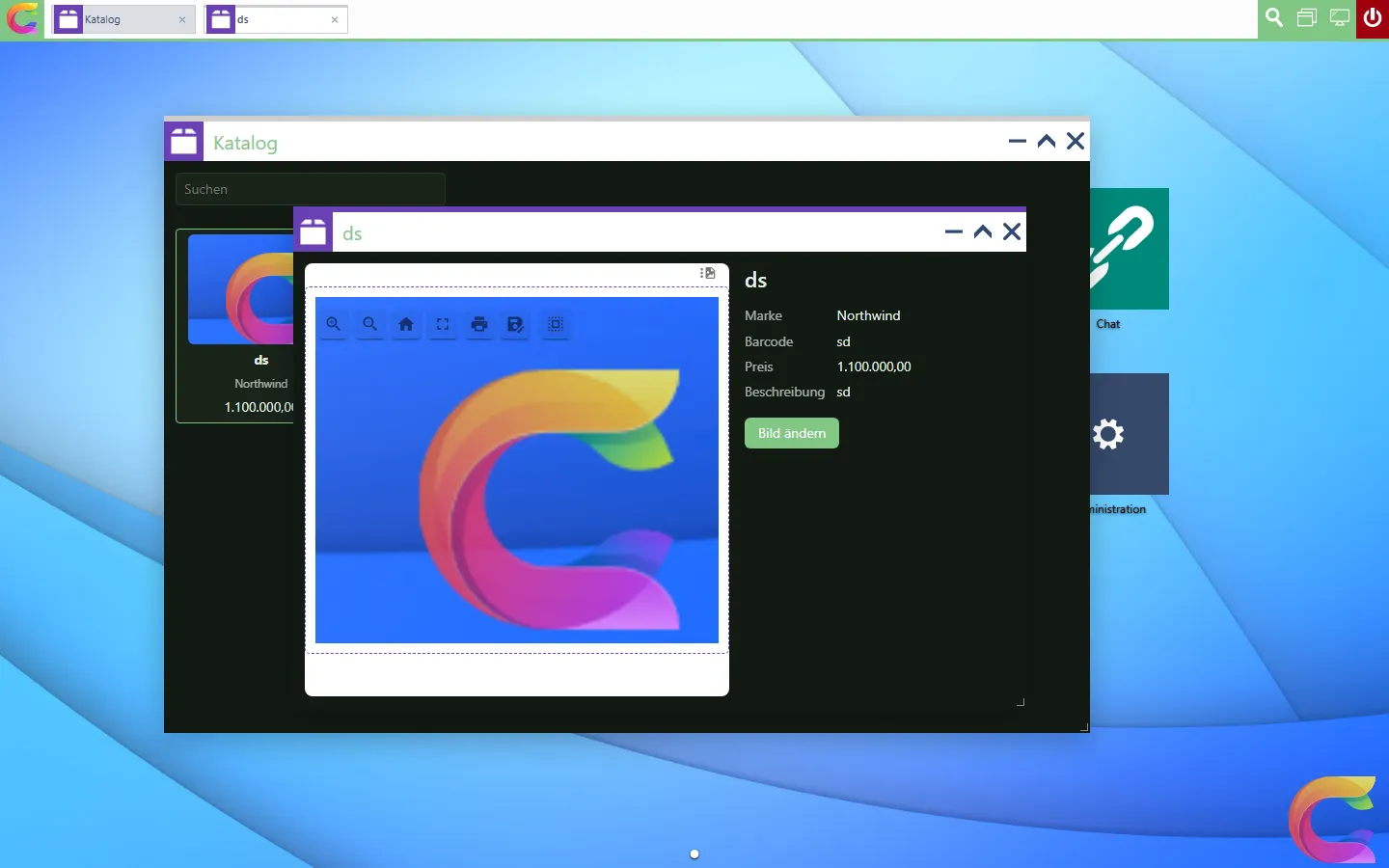
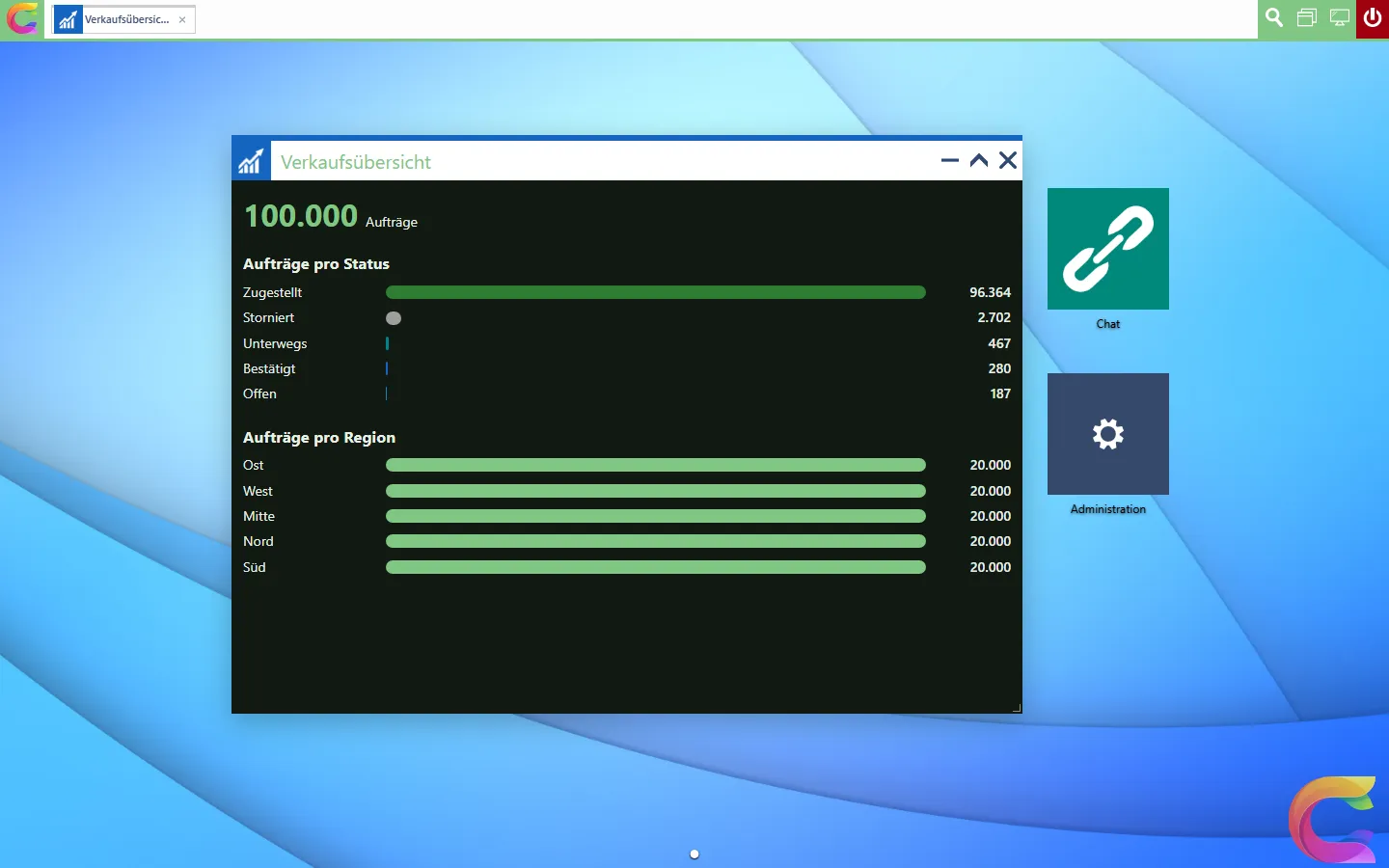
The demo app has an AirWorks client next to its Blazor app, src/MyApp.AirWorks, set up exactly as --airworks generates it. Next to the library's apps it brings three hand-written ones in ClientApp/src/apps, built on the demo's own catalog and sales data:
| File | App | Shows |
|---|---|---|
catalog.ts |
Catalog: products as cards with image, brand and price | OData with odataPage, permission, desktop search, opening another app, realtime refresh |
product.ts |
Product window: image, details, Change image | the app's own REST endpoint typed with its SDK, intents, coworkee.can, a MudEx web component, a write |
sales-dashboard.ts |
Sales dashboard: 100,000 orders per status and region | counts on the server (facets), realtime refresh with a pause |
1. Write the app
An app is a function that gets the coworkee object and returns an AirWorks app definition. The demo keeps each app in a file of its own:
import { esc, type Coworkee, type CoworkeeApp } from '@coworkee/airworks';
import type { AppContext } from '@fgilde/airworks';

export const catalogApp = (coworkee: Coworkee): CoworkeeApp => ({
  id: 'myapp.catalog',
  title: coworkee.t('Catalog'),
  icon: 'ratio-product.png',
  accent: '#6a3fb5',
  width: 960,
  height: 640,
  requiredPermissions: ['Catalog.Products.View'],
  render: ({ host, intent, onIntent, onClose }: AppContext) => {
    host.classList.add('cw-host');
    host.innerHTML = `<div class="cw-app myapp-catalog">...</div>`;
    // ...
  },
});
render gets the window's element (host) and the window's context: onClose for cleaning up, setTitle, intent/onIntent/setState for data passed to the window. Icons are file names of the AirWorks icon set, which the template serves under /icons/ (ratio-product.png, ratio-graph.png, fn-dashboard.png, ...). The classes cw-host, cw-app, cw-toolbar, cw-muted and cw-error give your app the look of the library's apps; your own styles go to ClientApp/src/styles.css and use the theme's CSS variables (--cw-primary, --cw-surface, --cw-text, ...).
2. Register it
In ClientApp/src/main.ts the apps go to register after the library's:
await coworkee.register(
  ...defaultApps,
  ...adminApps,
  catalogApp,
  productApp,
  salesDashboardApp,
  embedApp({ id: 'myapp.orders', title: 'Orders', path: '/sales/orders', icon: 'fn-planning.png', accent: '#2e7d32', requiredPermissions: ['SalesOrders.View'] }),
);
Every visible app gets a desktop shortcut; hidden: true keeps one out of the start menu (the product window, which only opens with a product).
3. Read data
OData entity sets go through odataPage of @coworkee/client; the rows carry the property names of the entity:
import { odataPage, searchFilter } from '@coworkee/client';

type ProductRow = { Id: string; Name: string; Rate: number; ImageDataUrl?: string | null; Brand?: { Name: string } | null };

const loadProducts = (text: string, top: number) => odataPage<ProductRow>('Products', {
  select: ['Id', 'Name', 'Rate', 'ImageDataUrl'],
  expand: 'Brand($select=Name)',
  filter: searchFilter(['Name', 'Brand/Name'], text),
  orderBy: 'Name',
  top,
});
The app's own endpoints go through coworkee.request, which sends the session cookie and the CSRF header through the BFF. The demo types them with the DTOs of its generated TypeScript SDK (sdk/typescript), imported as types only:
import type { components } from '../../../../../sdk/typescript/src/schema';

type Product = components['schemas']['ProductDto'];

const product = await coworkee.request<Product>(`/api/v1/products/${encodeURIComponent(id)}`);
The library's own endpoints are typed already: coworkee.api.GET('/api/v1/...').
4. Permissions
requiredPermissions hides an app from users without them: no shortcut, no start menu entry, no search hits. When a grant changes, the desktop shows or hides the app at once. Parts of an app check coworkee.can; the API checks the permission again on every call:
${coworkee.can('Catalog.Products.Edit')
  ? `<label class="myapp-upload"><span>${esc(t('Change image'))}</span><input type="file" accept="image/*" hidden/></label>` : ''}
Signed in as the demo user without roles, the desktop shows neither Catalog nor Sales dashboard.
5. Open another app with data
An app opens another with an intent; the opened app reads it in render and in onIntent (the window is already open) and keeps it with setState, so it comes back after a reload:
// catalog.ts
const open = (id?: string) => id && coworkee.airWorks.openApp(productAppId, { id });

// product.ts
onIntent(show);
void show(intent);
// in show: setTitle(product.name); setState({ id: product.id }, product.name);
6. Desktop search
search adds hits to the search of the desktop; choosing one opens the app with the hit's intent:
search: async (query) => (await loadProducts(query, 8)).items.map((product) => ({
  title: product.Name, description: product.Brand?.Name ?? '', icon: 'ratio-product.png', intent: { id: product.Id },
})),
The global search of the server is in the desktop search too: useCoworkee registers globalSearchProvider, which asks GET /api/v1/search and opens reports, chats and files in their apps and records of OData sets in the data app. To open a set's records in your own app, register the provider again with a target of your own (the same id replaces it):
airWorks.registerSearchProvider(globalSearchProvider(coworkee, (hit) =>
  hit.provider === 'products' ? { appId: 'myapp.product', intent: { id: hit.id! } } : defaultSearchTarget(hit)));
7. A MudEx web component
mudExFrame puts a MudBlazor.Extensions web component into a frame of its own (see File preview). The product window shows the product image in the file display, which takes data URLs as well:
image.append(mudExFrame('mudex-file-display',
  { url: item.imageDataUrl, 'content-type': contentType, 'file-name': item.name, 'show-file-name': 'false' },
  { frameUrl: coworkee.mudExFrameUrl, dark: coworkee.mode === 'dark', title: item.name }));
8. Realtime
Entities with [Realtime] announce their changes on the topic type:{Entity} to everybody who may read them. Follow the topic while the window is open; subscribe returns the function that stops it:
A new image saved in the product window shows up in the catalog's card that way, also in other browsers.
9. Count on the server
The sales dashboard reads no rows: OData answers $top=0&$count=true with the total and, with the Prefer header, the facets the entity declares with [ProvideFacet], counted on the server over all 100,000 orders:
const page = await coworkee.request<FacetPage>('/odata/SalesOrders?$top=0&$count=true',
  { headers: { Prefer: 'odata.include-annotations="cn.facets"' } });
// page['@odata.count'], page['@cn.facets']: [{ field: 'Status', options: [{ label, count, meta: { color } }] }, ...]
10. Texts
coworkee.t looks the English text up in the texts the API serves for the user's language: those of the library, the app's own (Localization/*.json embedded in a project of the app, in the demo src/MyApp.Contracts/Localization/de.json) and translations made under Translations. Placeholders work like in .NET:
"Catalog": "Katalog",
"Sales dashboard": "Verkaufsübersicht",
"The image must be smaller than {0}.": "Das Bild muss kleiner als {0} sein."
11. Build and run
dotnet build builds the client with npm (tsc --noEmit checks the types first). Start the app host and open myapp-airworks from the Aspire dashboard; while the host runs, npm run build in ClientApp is enough for a change, the host serves wwwroot as it is. The demo takes @coworkee/client and @coworkee/airworks from npm in the version of the release it is built against (0.0.1023), not from the template's tarballs.
The packages
| Package | Content |
|---|---|
@coworkee/client |
Types of the library API generated from its OpenAPI description, createCoworkeeClient() (openapi-fetch with the session cookie and the CSRF header, or a bearer token), apiRequest, ApiError with the problem details, createRealtime() (SignalR), postNdjson for streamed answers, BFF helpers, theme, texts and OData helpers. Framework free, see SDKs. |
@coworkee/airworks |
useCoworkee, the apps above, crudApp, the dialogs and lookups, renderEntityTable, renderWidget, mudExFrame, the styles. Needs @fgilde/airworks. |
Their sources live in typescript/ of the library. The template ships both as tarballs, and a generated app takes them from ClientApp/vendor (file:vendor/*.tgz): npm install needs no npm registry for them, so an app works right after a release and offline from the template. AirWorks itself comes from GitHub at a fixed commit.
Every release also publishes them to npm in the version of the release: a.b.c stays, a.b.c.d becomes a.b.(c*1000+d) because npm knows no fourth part (release 0.0.1.21 is 0.0.1021 on npm). To take them from npm, create the app with coworkee new --airworks --airworks-packages npm (Studio: AirWorks packages, dotnet new coworkee --airworksPackages npm); ClientApp/package.json then references exactly the version of the template. An existing app switches by putting that version into ClientApp/package.json and deleting ClientApp/vendor.
coworkee new --template-source <nupkg> with a local build (pwsh build/pack-local.ps1) adds the folder of the template as package source coworkee-local to the app's nuget.config, so the app restores the Coworkee packages of the same build.